
What is Activity Log?
Learn how Activity Log records the operations run for the console and the REST API, with who ran them, when, on which resource, and with what result.
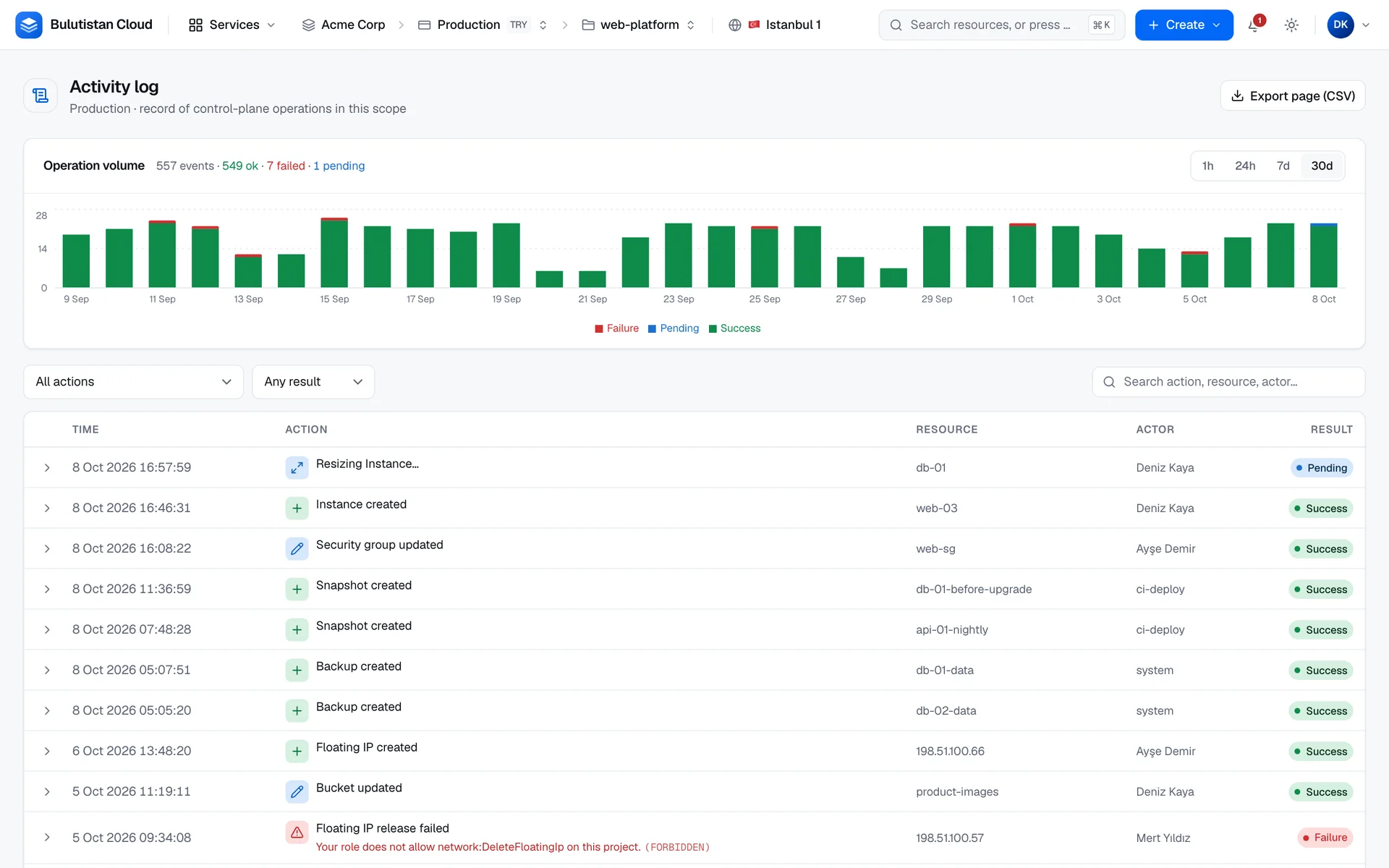
Activity Log is the record of the operations that the platform runs for requests made in the console and through the REST API: what was done, to which resource, by whom, when, and whether it succeeded. Use it to answer "who deleted this volume?", to find out why a change failed, or to review what happened during an incident. You find it in the console under Activity log.
Key features
- Time ranges with totals. Look at the last hour, 24 hours, 7 days, or 30 days, with a chart of the operations over time and their counts by result. See Filter and export activity.
- Filters and search. Narrow the list by action and by result, and search across actions, resources, and users. See Filter and search.
- Failure reasons. A failed operation shows its reason and error code right in the list.
- Operation details. Expand an operation to see its ID, its action, and its full record as JSON.
- Links to resources. Open the resource that an operation changed from its row.
- CSV export. Download the operations of the page that you're viewing. See Export a page.
How it works
Changes such as creating an instance, resizing it, or deleting a volume run as operations. An operation records the action, the resource, the user or service account that requested it, and the IP address that the request came from. It also records when it started and finished, and how it ended. Activity Log lists these operations, newest first.
Each operation has one of three results:
| Result | The operation |
|---|---|
| Success | Finished successfully. |
| Failure | Failed, or was canceled. |
| Pending | Is waiting or still running. |
An operation that the platform starts on its own, without a user, shows the actor system.
What it includes. The operations of the selected project, and the operations that apply to the whole tenant or subscription. The latter appear in every project of the tenant.
Which operations are recorded. The operations listed in What's recorded, whether you start them in the console or through the REST API. Only the operations listed there are recorded.
Retention. Finished operations are deleted after a retention period that the platform operator sets, and the console shows the last 30 days at most. To keep a record for longer, export it regularly.
Failed operations that you started, or that you can see, also appear in the console's notification feed. A resource's own page, such as an instance's Activity tab, shows the operations on that resource among the project's 50 most recent operations.
Use cases
- Audit a change. For a change made in the console or through the REST API, search for the resource's name to see who made it and when.
- Investigate a failure. Filter by Failure to list the failed operations of the last 30 days with their reasons.
- Review an incident. Select the Time range of the last hour or 24 hours, and read what changed.
- Keep your own record. Export the pages you need as CSV files.
Billing
Activity Log has no billing dimension.
Limits
- The console shows the last hour, 24 hours, 7 days, or 30 days.
- A page lists 50 operations. The export covers the page on screen.
- Finished operations are kept for a retention period that the platform operator sets.
Related services
- Identity & Access Management: the users and service accounts that appear as actors, and the roles that allow them to act.
- Monitoring & Alerts: alerts about the state and metrics of your instances, and the notification feed.
- Resource Explorer: the current state of every resource in the project.