
What is Monitoring & Alerts?
Learn how Monitoring & Alerts charts virtual machine metrics and notifies you by email or webhook when instances fail or cross a threshold.
Monitoring & Alerts collects CPU, memory, disk, and network metrics from your virtual machines and charts them on each instance's page. Alert rules watch the instances of a project that carry the tags you choose, and notify you by email or webhook when an instance enters the ERROR state or one of its metrics crosses a threshold, and again when it recovers.
Key features
- Instance metrics. Turn on monitoring for an instance, and chart its CPU and memory use, disk throughput, IOPS, and latency, and network traffic over the last hour, 24 hours, or 7 days. See View virtual machine metrics.
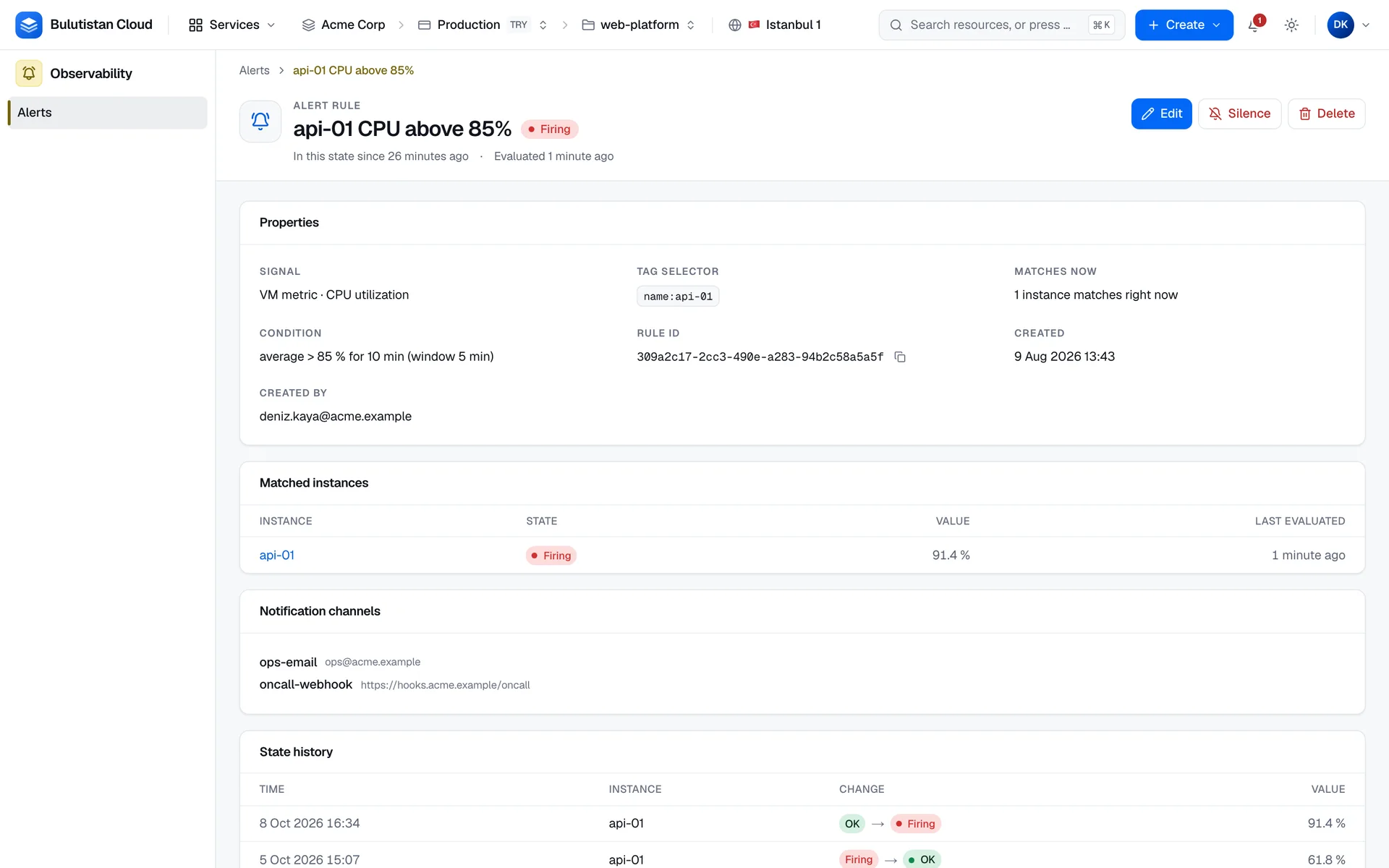
- Two kinds of alert rules. Alert when an instance is in the ERROR state, or when a metric such as CPU utilization or network throughput crosses a threshold. See Create alert rules.
- Tag selectors. A rule watches every instance in the project that carries all of its tags. An instance that you tag later joins the rule on its own. See Choose instances with a tag selector.
- One alert per instance. Each matched instance fires and resolves on its own, so a rule over a whole tier tells you which instance needs attention.
- Fire and resolve notifications. Channels are notified when an alert fires and when it resolves. Every change is kept in the rule's state history.
- Email and webhook channels. An address that doesn't belong to an active user of your organization receives nothing until it's confirmed. Webhook requests are signed with a per-channel secret that the console shows only once. See Send alerts by email and webhook.
- Alerts from a chart. Start a rule from a metric chart, with the metric and a suggested threshold already filled in. See Create an alert from a chart.
How it works
Monitoring is a setting of each instance, and it's off by default. The metrics are measured on the hypervisor that runs the instance, so you don't install anything in the guest to collect them. The one exception is memory utilization: it needs the guest to report its available memory through a balloon driver. The console shows an instance's metrics only for the times when its monitoring was on.
An alert rule has a signal, a tag selector, and a condition. The platform evaluates every enabled rule on a regular cycle, separately for each instance that the selector matches. A rule fires for an instance when its condition has held for the duration that you set, and resolves when it no longer holds. When the platform can't measure an instance, for example because the instance isn't running on the cloud yet or the window holds no samples, the instance shows No data, and no one is notified. A metric rule skips the matched instances whose monitoring is off. If such an instance's alert was firing, it resolves, and the rule's channels are notified once.
Notifications go to the rule's channels, which are the email addresses and webhook URLs of the project. Users who can read the project's alerts also see each fire and resolve in the console's notification feed. Budgets in Cost Management send their alerts through the same system.
Use cases
- Failed instances. Get an email when any production instance goes into ERROR, with a rule over a tag such as
env: prod. - Sustained load. Notify an on-call system through a webhook when the average CPU utilization of a web tier stays high for 10 minutes.
- Network problems. Watch interface errors and drops with the maximum aggregation, so a single bad minute is enough to alert.
Billing
Monitoring & Alerts bills these dimensions:
| Dimension | How it's billed |
|---|---|
| VM monitoring | Per hour for each instance while its monitoring is on, when monitoring has a price in your region. |
| Alert rules | Per hour for each instance that an enabled rule evaluates, when alert rules have a price. A silenced rule isn't billed, and a metric rule isn't billed for matched instances whose monitoring is off. How often a rule fires doesn't change its charge. |
The 60-second minimum charge applies once to each instance's monitoring and once to each rule, not again each time you turn them off and on. Notification channels and the notifications they send have no billing dimension. For how usage becomes charges on your invoice, see How billing works. For prices, see Pricing.
Limits
- Charts cover the last hour, 24 hours, or 7 days.
- Rules are evaluated on a cycle that the platform operator sets, over an evaluation window of 60 seconds to 24 hours.
- A rule can use up to 10 tag pairs and notify up to 10 channels, and it evaluates at most 200 matched instances.
- Each project has limits on alert rules, counted per matched instance, on notification channels, and on webhook channels. The platform operator sets them.
For all rules and limits, see Alert rule limits.
Related services
- Virtual Machines: the instances that you monitor, and the tags that alert rules select on.
- Cost Management: budgets whose alerts use the same channels and feed.
- Activity Log: the operations that the platform runs for requests in the console and the REST API.