
Boot sources: images, volumes, and snapshots
Choose where an instance's OS disk comes from (an image, an existing bootable volume, or a snapshot) and how each affects disk size and deletion.
Every instance boots from a Block Storage volume, its OS disk. The boot source decides where that disk comes from. You choose it on the Basics step of the creation wizard, under Boot source.
| Boot source | OS disk | OS disk size | Deleted with the instance | Several instances per request |
|---|---|---|---|---|
| Image | A new volume created from the image | You choose it; at least the image's minimum disk size | Yes, unless you keep it | Yes |
| Volume | The existing volume itself | The volume's size | No | No |
| Snapshot | A new volume created from the snapshot | You choose it; at least the snapshot's size | Yes, unless you keep it | Yes |
The OS disk is a volume like any other: it appears under Block Storage and is billed per GB-month for as long as it exists. When you delete an instance, you can keep an OS disk that the platform created for it. While restore points or images of the instance exist, the OS disk isn't deleted. For details, see Delete an instance.
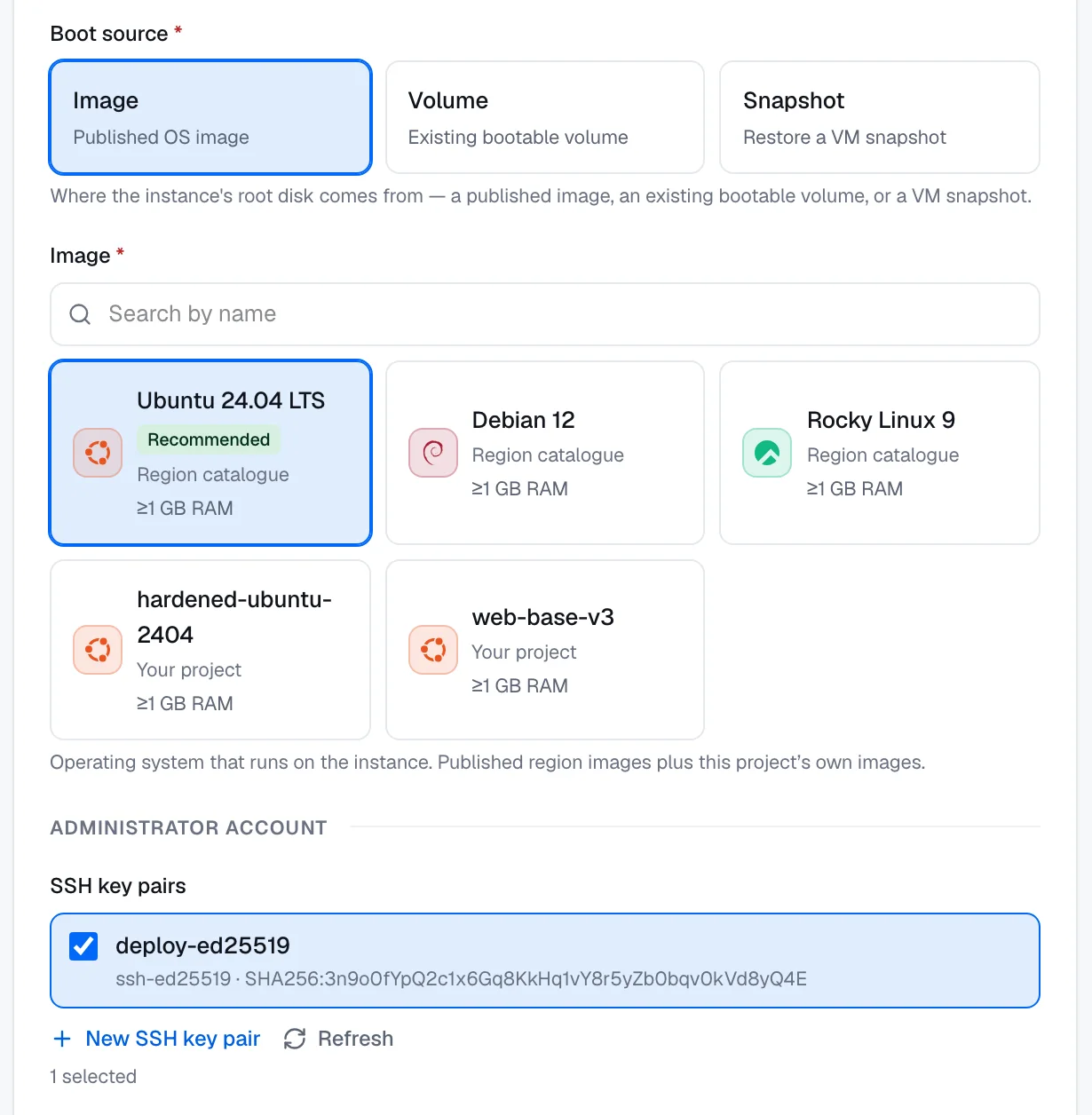
Image
An image contains an operating system. The image list combines two sources, and each tile names its source:
- Region catalogue: images that the region's operator publishes. Only these images can be marked Recommended.
- Your project: images that aren't in the region's catalog, such as the images captured in your tenant's projects. Only images whose status is Available are listed.
An image can set two minimums:
- Minimum memory. The tile shows it, for example ≥1 GB RAM. Sizes with less memory are disabled on the Size step.
- Minimum disk size. The OS disk must be at least this size. If your OS disk is smaller, the wizard raises it.
The wizard creates the OS disk at 30 GB unless the image needs more. You can make it larger on the Disks step. The wizard shows the disk's type, the volume class that the region provisions, but you can't change it.
Some images carry a software license. A license that comes with the image is billed on every instance that boots from the image. On the Add-ons & licenses step, such a license is selected and locked, with the note Included with the chosen image — billed while the VM exists.
To create your own images, see Capture an image from a virtual machine.
Volume
Boot from an existing volume when you already have a disk with an operating system on it. The volume must be bootable, its status must be Available, and it must not be attached to another instance.
The volume becomes the OS disk, so its size is the volume's size, and the Disks step shows no OS disk size.
- You can't create several instances at once from one volume, because one volume can be the OS disk of only one instance.
- When you delete the instance, the volume isn't deleted. It stays in your project and keeps being billed until you delete it.
If no volume qualifies, the wizard shows No bootable AVAILABLE volumes — create one from an image first. For how to create volumes, see Create a volume.
Snapshot
Boot from a snapshot to start a new instance from a saved state. The list contains two kinds of snapshots whose status is Available:
- VM snapshot: an instance restore point.
- Volume snapshot: a snapshot of a volume.
The platform creates a new OS disk from the snapshot. The OS disk must be at least the snapshot's size, and the wizard raises it to that size when needed.
From an instance restore point, the platform also creates a data volume from each of its other disks, at its original size, and attaches it. These volumes are billed as volumes, and they're kept when you delete the instance.
You can also start from a restore point's page. See Create an instance from a restore point.