
What is Virtual Networks?
Learn what Virtual Networks offers, how networks, subnets, routers, and ports fit together, and which dimensions you are billed for.
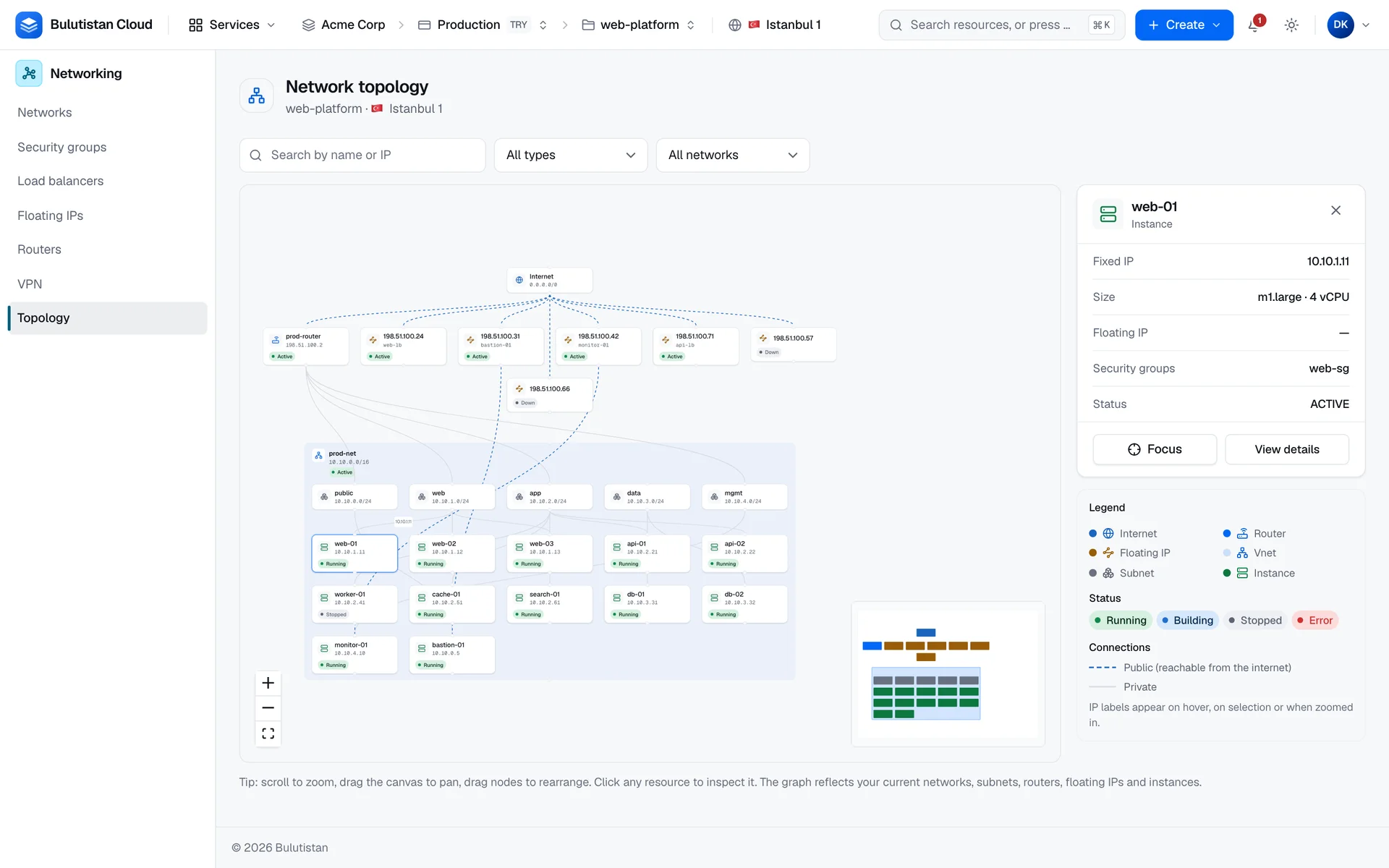
Virtual Networks lets you build private networks for the resources in your project. You create a network, divide it into subnets with private IPv4 address blocks, and connect subnets to each other and to the internet with routers. Instances connect to subnets through ports. The console also checks why an instance can or can't reach the internet, and draws a live topology of your networks.
Key features
- A network and its first subnet in one request. The console suggests a free private block and fills in the gateway address. See Quickstart: Create a network with a subnet and a router.
- Subnets with DHCP, DNS servers, host routes, and allocation pools. See Manage networks and subnets.
- Routers with an external gateway. A router connects your subnets with each other and, through its external gateway, with the internet. See Manage routers and static routes.
- Static routes and a route table. Send an address range to a next hop, and review the routes of a router in one table. See Subnets, routers, and routes.
- Outbound access through SNAT, inbound access through Floating IPs. See Internet access: SNAT and Floating IPs.
- Ports with fixed IPs and port security. Reserve an address, choose the security groups of a port, and let extra addresses through for virtual IPs. See Ports, fixed IPs, and port security.
- Internet access check. Follow the path from an instance to the internet step by step, with a link to the fix for the first failed step. See Check a virtual machine's internet access.
- Live topology. See how networks, subnets, routers, Floating IPs, and instances connect, with public and private paths drawn differently. See View the network topology.
How it works
A network is an isolated layer-2 network in a project. Subnets give it address ranges, and their DHCP service hands out the addresses. In the console and the REST API, a subnet's block must be a private IPv4 block inside 10.0.0.0/8, 172.16.0.0/12, or 192.168.0.0/16. An instance connects to the network through a port, which takes its fixed IP address from one of the network's subnets. The port also holds the security groups that filter the instance's traffic.
A router connects subnets. Each subnet that you attach becomes an interface of the router. A router with an external gateway also connects these subnets to an external network, the way to the internet. An instance without a Floating IP reaches the internet through the router's SNAT address. A Floating IP makes an instance reachable from the internet.
Creating and deleting networks, routers, and ports run as asynchronous operations. A new network or router is Building until the platform finishes it, and then Active, or Error with the reason on its page. Changes to subnets take effect when you save them.
Virtual Networks is available where the project's region offers it. In a region that doesn't, the console leaves Networks and Routers out of the menu, a link to one of their pages shows a notice instead of the page, and new networks and routers are refused.
Use cases
- Multi-tier applications. Put web, application, and database servers in separate subnets of one network, connect the subnets with a router, and control which tier reaches which with security groups.
- Private back ends. Run servers without public addresses that still reach the internet for updates through the router's SNAT address.
- Hybrid connectivity. Connect your subnets to an on-premises network over an IPsec tunnel with Site-to-Site VPN.
Billing
Virtual Networks bills these dimensions:
| Dimension | How it's billed |
|---|---|
| Router | Per hour from creation until deletion, when routers have a price in your region. A router that never becomes Active isn't billed. |
| Internet egress | Per GB that leaves the cloud through a router's external gateway, when egress has a price in your region. Inbound traffic isn't counted. Traffic that a load balancer sends is billed as load balancer egress instead. |
| Floating IP | Per hour while the address is allocated, whether or not it's associated. See Floating IPs. |
Networks, subnets, and ports aren't billed. Every time-based charge is billed for at least 60 seconds over the resource's lifetime. For how usage becomes charges on your invoice, see How billing works. For prices, see Pricing.
Limits
- In the console and the REST API, a subnet's block must be a private IPv4 block inside 10.0.0.0/8, 172.16.0.0/12, or 192.168.0.0/16.
- Network and router names use 1–63 lowercase letters, numbers, and hyphens, and must be unique within the project.
- A port that you create in the console holds one fixed IP address.
- Networks, subnets, ports, routers, and Floating IPs count against the subscription's quota and the project's allocation. See Quotas.
For all limits, see Virtual Networks limits.
Related services
- Security Groups: rules that filter the traffic of ports.
- Floating IPs: public IPv4 addresses for your instances.
- Load Balancers: spread traffic over servers in your subnets.
- Site-to-Site VPN: connect your subnets to another site.
- Virtual Machines: the instances that you connect to your networks.
Next steps
Quickstart: Create a network with a subnet and a router
Set up a network that instances can use to reach the internet.
Manage networks and subnets
Create networks, and add and change their subnets.
Manage routers and static routes
Connect subnets, set the external gateway, and add static routes.
Check a virtual machine's internet access
Find the step that blocks an instance, and fix it.