
What is Site-to-Site VPN?
Learn what Site-to-Site VPN offers, how its five objects build an IPsec tunnel to your network, where it's available, and how it's billed.
Site-to-Site VPN connects a network outside the cloud, such as an office or a data center network, to subnets in your project through an IPsec tunnel. The tunnel ends on one of your routers that has an external gateway, and the two gateways authenticate each other with a pre-shared key. There are three ways to set it up: a quick setup that needs a name, the remote CIDRs, the peer address, and a pre-shared key; a guided setup that walks through every object; or creating the objects one by one.
Key features
- Quick setup. Name the connection, and the console configures the VPN service, both policies, and the local network with recommended settings. You supply the remote CIDRs, the peer address, and a pre-shared key. See Connect a site with quick setup.
- Guided setup. Seven steps, from the VPN service to a summary that shows which objects are reused and which are created, before anything is written. See Create a site connection with the wizard.
- Reusable objects. One VPN service, IKE policy, IPsec policy, or endpoint group can serve many site connections. See Reuse and changes.
- Several subnets per tunnel. One site connection carries every local subnet that should reach the same peer. See Endpoint groups.
- Recovery from a partial run. If the guided setup stops part-way, it lists every object it already created, and you decide whether to keep them and retry or delete them. See If the run stops part-way.
- Dead peer detection and tunnel controls. Set how the gateway reacts when the peer stops answering, and enable, disable, or restart a tunnel. See Disable, enable, or restart a tunnel.
How it works
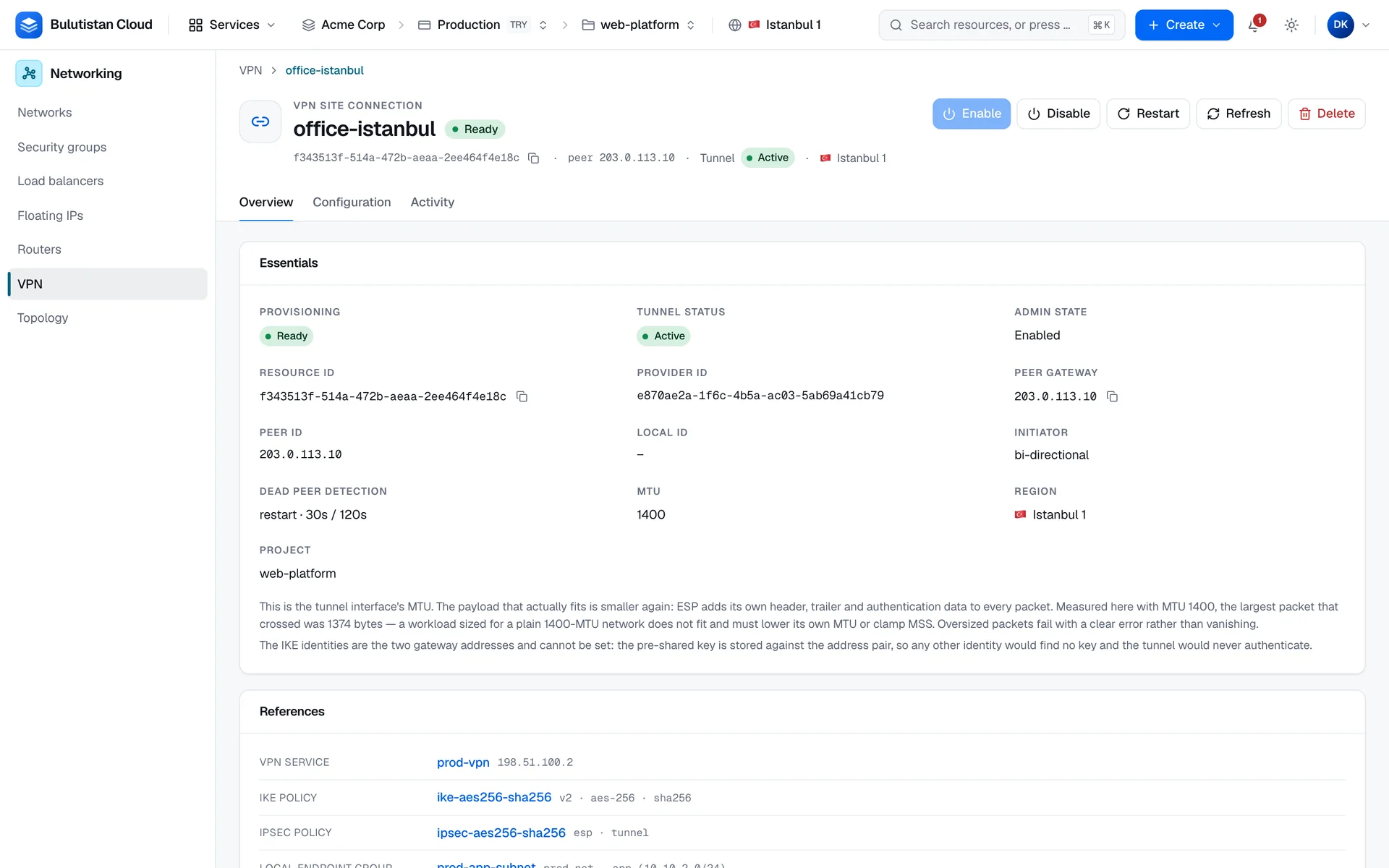
A tunnel is built from five objects, which keep their OpenStack names so that what you see in the console maps onto the OpenStack VPN API:
- A VPN service anchors tunnels on a router that has an external gateway. The router's external address is the tunnel's local endpoint.
- An IKE policy sets phase 1: how the two gateways authenticate each other and agree on keys.
- An IPsec policy sets phase 2: how the traffic inside the tunnel is protected.
- Two endpoint groups name the two ends: the local subnets in your project, and the remote CIDRs.
- A site connection is the tunnel itself. It ties the four objects to one peer gateway, with the pre-shared key and the dead peer detection settings.
A site connection only refers to the other four objects, and they can be shared by many connections. While a connection uses an object, the object can't be deleted, and a policy can't be changed. For the details, see Services, policies, endpoint groups, and site connections.
Each object has a provisioning status, which says whether the platform has finished creating or changing it. VPN services and site connections also carry the status that the provider reported; for a site connection, that's the tunnel status. A tunnel status of Active means that the tunnel's security associations are established; it isn't proof that traffic passes.
Site-to-Site VPN is available where the project's region offers it: the region's network service must provide the VPN extension, and the region's operator can also turn the service off. In a region without it, the console leaves VPN out of the menu, a link to a VPN page shows a notice that VPN isn't offered in the region, and the API refuses to create VPN objects. The notice adds: This project's region cannot be changed. To use it, open a project in a region that offers it. Anything you already have in other projects is unaffected.
Use cases
- Hybrid networks. Reach servers in your project from an office or data center network over an encrypted tunnel.
- Several sites. Connect each remote gateway with its own site connection, and let all of them share one VPN service and the same policies.
Billing
Site-to-Site VPN bills these dimensions:
| Dimension | How it's billed |
|---|---|
| Site connection | Per hour, metered per second, from creation until deletion. Billing applies once a tunnel status has been recorded for the connection, and then covers its whole life from creation. A connection that never had a tunnel status recorded isn't billed. |
| VPN services, IKE and IPsec policies, and endpoint groups | No charge of their own. |
A site connection is billed for at least 60 seconds over its lifetime. The router that the VPN service runs on is billed as a router; see Virtual Networks. For how usage becomes charges on your invoice, see How billing works. For prices, see Pricing.
Limits
- Use one site connection per peer gateway. A second connection between the same two gateways doesn't carry traffic; put every local subnet that should reach the peer into one local endpoint group instead.
- Every subnet in a local endpoint group must be attached to the VPN service's router.
- A pre-shared key has at least 8 characters, and it can't be read back.
- A site connection's MTU can't exceed the tenant network MTU of the deployment.
- A name has 1–255 characters and must be unique among the objects of its type in the project.
Related services
- Virtual Networks: the routers and subnets that a tunnel connects.
- Security Groups: rules that filter traffic to your servers.
- Activity Log: the operations that created and changed your VPN objects.
Next steps
Connect a site with quick setup
Create a tunnel from one name, the remote CIDRs, the peer address, and a pre-shared key.
Create a site connection with the wizard
Every step of the guided setup, with reuse and failure handling.
Services, policies, endpoint groups, and site connections
The objects, the values they accept, and how to configure the peer device.
Edit, disable, and delete VPN objects
Change a connection, control its tunnel, and delete objects in the right order.
Troubleshoot site connections
Refused requests, a tunnel that doesn't come up, and other problems.